
The Chrome New Tab Extension Market: Users, Leaders, and Features
Every time you open a new tab in Chrome, more than 12,000 extensions are competing for that page. Some show your bookmarks, others show news or nature photos, and a few give you a virtual cat. There is even an extension that simply opens an address of your choice, or a blank page, instead of the new tab. It has 700,000 users.
I collected data on all of these extensions as of October 5, 2026. I wanted to understand how this market works: who leads it, how many users a typical extension has, and how far you can trust the stars in the store.
Key findings
- 12,306 extensions replace the Chrome new tab page.
- Only two have more than a million users: Momentum and Visual Bookmarks, with 2M each.
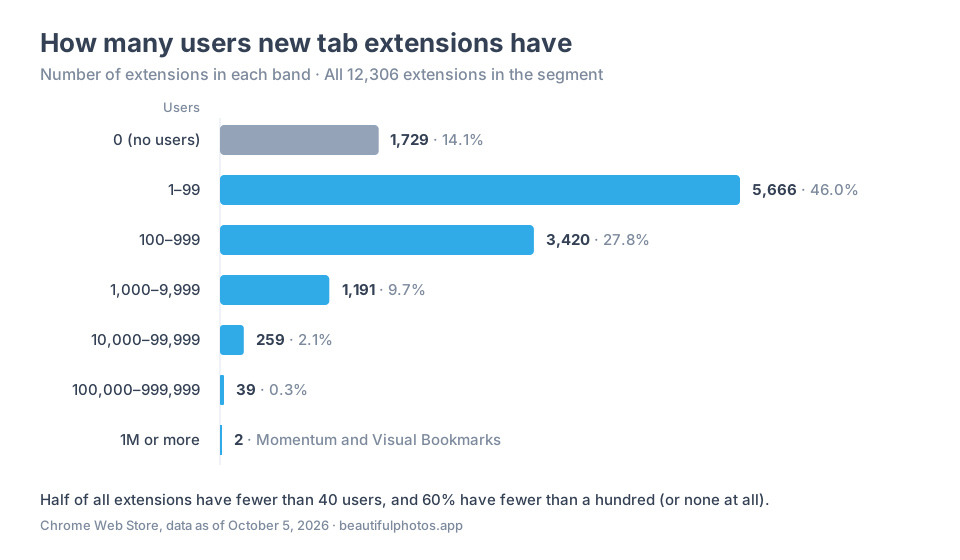
- 14% of extensions (1,729) have no users at all, and the median across the whole market is 40 users.
- The 100 largest extensions account for 71.6% of all users in the segment.
- Almost half of the extensions have no ratings, and nine out of ten have fewer than ten. That is why the average score often tells you very little.
All numbers come from the Chrome Web Store and describe a single date. So there are no trends here: one snapshot can't tell you who is growing and who is shrinking.
Two million for the leaders, 40 for a typical extension
If you line up the extensions by user count, the picture is very lopsided. 1,729 extensions (14.1%) have no users at all. Another 46% have fewer than a hundred. In total, six out of ten products have an audience of under 100 people, and almost nine out of ten haven't reached 1,000. Only 41 extensions have passed the 100,000 mark.
At the top, though, the numbers are huge. Add up the user counts of every extension and you get about 24.4 million. A third of that goes to the top ten, and 71.6% to the top hundred.
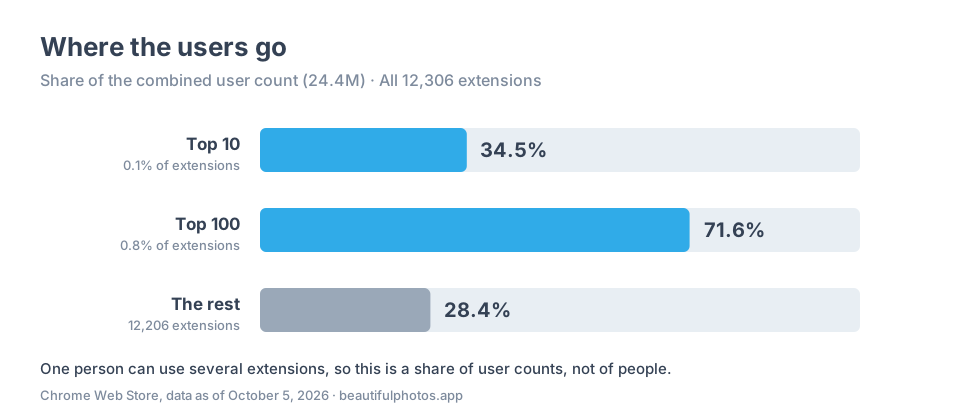
Put simply, the market is a thin layer of products everyone knows and a long tail of projects almost nobody installs.
One important caveat: a person can use several extensions at once. So 24.4 million is a sum of user counts, not a number of people.
To a developer, that long tail often looks like an opportunity ("the competition is weak, the niche is open"). In practice, it is almost always a sign that there is no demand.
The new tab is the screen people see most often in their browser, and they are reluctant to let random things in. So when you analyze this market, look at the extensions that already have an audience.
What people put in place of the blank tab
Here are the twenty largest extensions. The "Why people install it" column is based on their store descriptions and documentation.
| Extension | Users | Rating (votes) | Why people install it |
|---|---|---|---|
| Momentum | 2M | 4.49 (13,744) | Daily focus, to-dos, and photos |
| Visual Bookmarks | 2M | 3.36 (8,789) | Bookmark tiles |
| Glean | 800K | 4.27 (49) | Enterprise search and assistant |
| New Tab Redirect | 700K | 4.06 (3,190) | Open your own address instead of the tab |
| Earth View from Google Earth | 600K | 4.21 (5,183) | Background photos |
| MSN New Tab | 500K | 3.91 (199) | News |
| Speed Dial FVD | 500K | 4.69 (117,826) | Bookmark tiles |
| Tabby Cat | 500K | 4.39 (6,017) | Virtual pet |
| Infinity New Tab | 400K | 4.57 (11,801) | Links and search |
| Bonjourr | 400K | 4.90 (24,202) | Customizable start page |
| Muzli | 400K | 4.51 (834) | Design feed |
| Yahoo Homepage | 400K | 3.65 (75) | Portal start page |
| daily.dev | 400K | 4.82 (2,863) | Developer feed |
| UP Tab | 300K | 4.50 (6) | Background and search |
| Great Start - Homepage | 300K | 4.81 (16) | Links and search |
| Toby | 300K | 4.21 (3,289) | Tab collections and sessions |
| Speed Dial 2 | 300K | 4.10 (7,705) | Bookmark tiles |
| iTab New Tab | 300K | 4.40 (847) | Customizable start page |
| Infinity New Tab (Pro) | 300K | 4.93 (24,797) | Links and search |
| Wallsflow | 300K | 4.81 (4,368) | Live wallpapers, sounds, and Pomodoro |
Momentum and Visual Bookmarks both have 2 million users, so there is no single leader.
The list looks like a mixed bag, but the products fall into a few clear groups.
Quick access to sites
This is the most familiar job for a new tab. Visual Bookmarks, Speed Dial FVD, and Speed Dial 2 show your favorite sites as tiles, and Infinity adds search on top. Among the smaller extensions there is, for example, BNTP, which shows bookmark folders.
When comparing products like these, the details matter: how groups and folders work, whether there is an import option, and what syncs across devices. "Sync" in a description can mean copying settings, not a full cloud bookmark service.
Focus and productivity
Momentum shows a photo, your daily focus, to-dos, and links. Wallsflow combines live wallpapers with sounds, music, and a Pomodoro timer. Toby works differently: it saves groups of tabs into collections so you can come back to them.
Reading
For some products, the new tab becomes a place to read. Muzli curates design content, and daily.dev builds a feed for developers. MSN and Yahoo show general news and a portal page.
A professional feed and a general news portal solve different problems, even though both look like a feed.
A beautiful background
Earth View shows photos of the Earth, and Live Start Page shows animated backgrounds. Among the smaller extensions there are plenty of themed wallpapers, for example with the anime character Nezuko.
Many of these pages look alike: a background, a clock, a search bar. What sets them apart is where the images come from and what else is on the page.
Odd but popular
Tabby Cat puts an interactive pet on your new tab, and it has 500,000 users. New Tab Redirect doesn't offer a page of its own at all. It opens an address you choose, a local file, or a blank page, and 700,000 people have installed it.
Some tools are very narrow. World Clock shows the time in different cities, alarms, and timers, but it has five users.
Enterprise tools
Glean is enterprise search and an assistant for employees. It requires a work account, and the new tab page is opt-in (Glean's guide). So its 800,000 are users of the whole extension, not necessarily of its new tab.
The takeaway from this section is simple. All these extensions show up in the same place in the browser, but they mostly compete within their own group. A virtual cat is unlikely to steal users from a bookmark manager.
Five stars from two people
Almost half of new tab extensions have no ratings at all: 6,059 out of 12,306. For another 183, rating data is unknown, mostly because the crawler hasn't reached them yet.
6,064 extensions have ratings, and their median score is five stars. That sounds great, but half of these extensions have no more than two ratings. If you include the extensions without ratings, 93% have fewer than ten. A high score from a handful of people says almost nothing about quality.
The number of ratings grows with the number of users, but very unevenly:
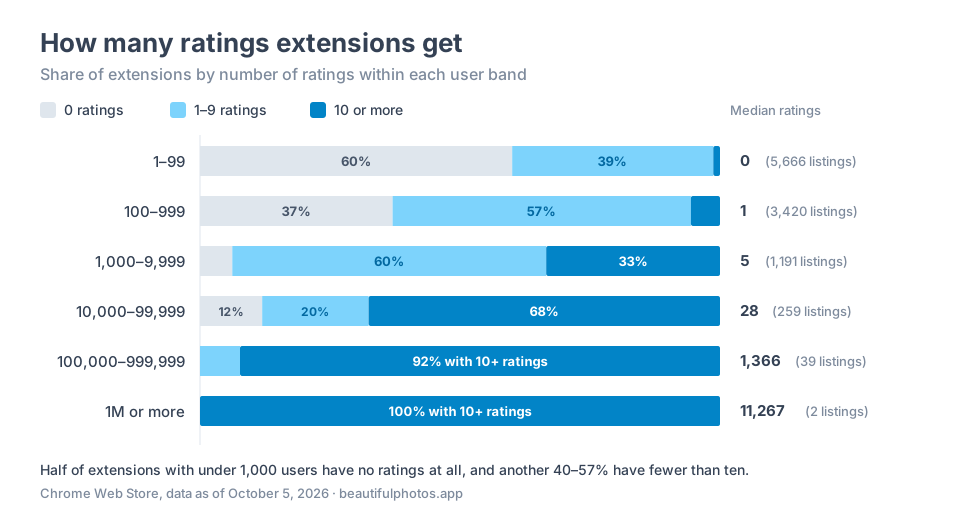
The spread is visible even among the leaders. UP Tab has 300,000 users and six ratings. Speed Dial FVD has 500,000 users and almost 118,000 ratings.
Most likely, a large number of reviews comes from some mechanism inside the extension, such as a prompt asking for a review. Simple, but effective.
I haven't analyzed the review texts yet, so there is nothing here about typical complaints or what people rate extensions for.
How to use this when looking for a niche
I'm building a catalog of the Chrome Web Store to find niches and ideas for new extensions. It is already clear where to start.
Compare against products that do the same job, not against the whole segment. 12,000 new tab extensions are not 12,000 competitors. For a bookmark manager idea, the competitors are Speed Dial and Visual Bookmarks, not Tabby Cat.
Before comparing products, it helps to answer four questions:
- What job does the product do?
- Which extensions should its users and ratings be compared with?
- Which features are built in, and which just open an external service?
- What is known about free access, and what still needs to be checked?
The main conclusion from this snapshot: there is no point in fighting "the whole market" in the Chrome Web Store. Successful extensions don't try to be everything for everyone. They pick one clear use case (bookmarks, focus, or reading) and work to become a daily habit.
To understand how to compete, you need to look at install trends and read what users complain about in reviews. Those are the topics of the next studies.
How I counted and what I don't know
Data. The Chrome Web Store catalog snapshot was taken on October 5, 2026, at 18:51 UTC: 382,203 records. I reviewed the descriptions of selected extensions on October 8–9, but all numbers in this article come from the snapshot.
Selection. Searching for "new tab" works poorly: it finds unrelated products and misses extensions with other names. So I selected records whose manifest declares a new tab override. There were 12,322 of them. After excluding nine themes and seven apps, 12,306 extensions remained. The manifests themselves were not checked separately.
Users. 1,729 extensions (14%) have no users. Including them, the median across the whole market is 40 users. If you count the median only among products with at least one user (10,577 extensions), it is 75. The sum of all user counts is 24,372,860. The top 100 account for 71.6% of all users in the segment.
Ratings. 6,059 extensions have no ratings.
Features. I reviewed 39 extensions in detail: the entire top 20, smaller extensions from different user bands for comparison, and Beautiful Photos. Features are taken from descriptions and documentation. I didn't install the extensions or test whether the features work. One of the 39 has no known name or description. These 39 extensions don't show which group is the most common across the segment.
Disclosure. Beautiful Photos is my project: nature photos from Unsplash on your new tab. In the October 5, 2026 snapshot, it had 492 users and a rating of 5 from 15 votes. It is described by the same rules as the others.
Data files: